QgsVectorFieldSettingsWidget Class Reference
A widget for setup of the vector field symbology settings. More...
#include <qgsvectorfieldsettingswidget.h>
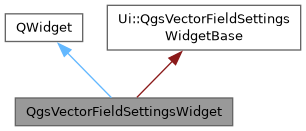
Inheritance diagram for QgsVectorFieldSettingsWidget:
Signals | |
| void | widgetChanged () |
| Vector field symbology settings changed. | |
Public Member Functions | |
| QgsVectorFieldSettingsWidget (QWidget *parent=nullptr) | |
| A widget to hold the vector field symbology settings. | |
| void | setHasMagnitude (bool hasMagnitude) |
| Sets whether the data behind the widget carries a magnitude. | |
| void | setMagnitudeRange (double minimum, double maximum) |
| Sets the minimum and maximum magnitude of the data, which the color ramp shader is classified against when it is loaded. | |
| void | setSettings (const QgsVectorFieldSettings &settings) |
| Synchronizes the widgets state with settings. | |
| void | setSupportsInterpolation (bool supported) |
| Sets whether the vector field behind the widget can be sampled between its data points. | |
| QgsVectorFieldSettings | settings () const |
| Returns vector settings. | |
Detailed Description
A widget for setup of the vector field symbology settings.
The widget knows nothing of where the vector field comes from: the caller describes the data through setSupportsInterpolation(), setHasMagnitude() and setMagnitudeRange(), then hands over the settings to edit with setSettings(). It is used by both the mesh layer and the raster layer properties.
- Since
- QGIS 4.4
Definition at line 42 of file qgsvectorfieldsettingswidget.h.
Constructor & Destructor Documentation
◆ QgsVectorFieldSettingsWidget()
| QgsVectorFieldSettingsWidget::QgsVectorFieldSettingsWidget | ( | QWidget * | parent = nullptr | ) |
A widget to hold the vector field symbology settings.
- Parameters
-
parent Parent object
Definition at line 22 of file qgsvectorfieldsettingswidget.cpp.
Member Function Documentation
◆ setHasMagnitude()
| void QgsVectorFieldSettingsWidget::setHasMagnitude | ( | bool | hasMagnitude | ) |
Sets whether the data behind the widget carries a magnitude.
When it does not, which is the case for a raster of coded compass directions, every vector has the same length: the magnitude filter, the magnitude dependent arrow scaling methods and the color ramp are hidden, leaving a fixed shaft length and a single color. Defaults to true.
Must be set before setSettings().
Definition at line 202 of file qgsvectorfieldsettingswidget.cpp.
◆ setMagnitudeRange()
| void QgsVectorFieldSettingsWidget::setMagnitudeRange | ( | double | minimum, |
| double | maximum ) |
Sets the minimum and maximum magnitude of the data, which the color ramp shader is classified against when it is loaded.
Definition at line 207 of file qgsvectorfieldsettingswidget.cpp.
◆ setSettings()
| void QgsVectorFieldSettingsWidget::setSettings | ( | const QgsVectorFieldSettings & | settings | ) |
Synchronizes the widgets state with settings.
Definition at line 214 of file qgsvectorfieldsettingswidget.cpp.
◆ setSupportsInterpolation()
| void QgsVectorFieldSettingsWidget::setSupportsInterpolation | ( | bool | supported | ) |
Sets whether the vector field behind the widget can be sampled between its data points.
When it cannot, which is the case for a mesh layer without faces, the streamline and trace symbologies are not offered and the user grid options are hidden, as all three place vectors at positions of their own rather than at the positions of the data. Arrows and wind barbs are still offered, as they are drawn one per data point. Defaults to true.
Definition at line 196 of file qgsvectorfieldsettingswidget.cpp.
◆ settings()
| QgsVectorFieldSettings QgsVectorFieldSettingsWidget::settings | ( | ) | const |
Returns vector settings.
Definition at line 118 of file qgsvectorfieldsettingswidget.cpp.
◆ widgetChanged
|
signal |
Vector field symbology settings changed.
The documentation for this class was generated from the following files:
- /build/qgis-4.3.0+git20261105+c8cdfe19d7b+99sid/src/gui/vectorfield/qgsvectorfieldsettingswidget.h
- /build/qgis-4.3.0+git20261105+c8cdfe19d7b+99sid/src/gui/vectorfield/qgsvectorfieldsettingswidget.cpp
Generated on for QGIS API Documentation by
 1.17.0